

Telegram, WhatsApp, Signal — they all share one flaw: your account, your messages and the rules of the game live on someone else’s server. Matrix changes the design itself: it’s an open protocol where you run your own server and talk to anyone, much like email. Let’s see why that beats the usual messengers, and how to stand up Matrix with the Element web client in Docker over one evening.
Table of contents
Open Table of contents
- What we usually pick from
- What “self-hosted” and “federated” mean
- The core problem with centralized messengers
- What Matrix changes
- A one-table comparison
- Clients and ecosystem maturity
- What you need to run your own server
- A mini example: a Telegram bridge
- How to verify it works
- Pitfalls and maintenance
- Bottom line
What we usually pick from
Almost every popular messenger is built the same way — centralized. Telegram keeps your chats (except secret ones) on its servers, unencrypted from its own point of view. WhatsApp encrypts content end-to-end, but it belongs to Meta, is tied to a phone number and harvests metadata: who messaged whom and when. Signal is a gold standard for crypto, but it’s still one central server with mandatory phone-number binding. Slack and Discord are handy for teams, but they’re closed SaaS: your data, history and access are entirely under their control.
What unites them is that you’re a guest in someone else’s house. An account can be banned, a service can leave your country, the pricing can change — and there’s no way to take your chat history and move it elsewhere.
What “self-hosted” and “federated” mean
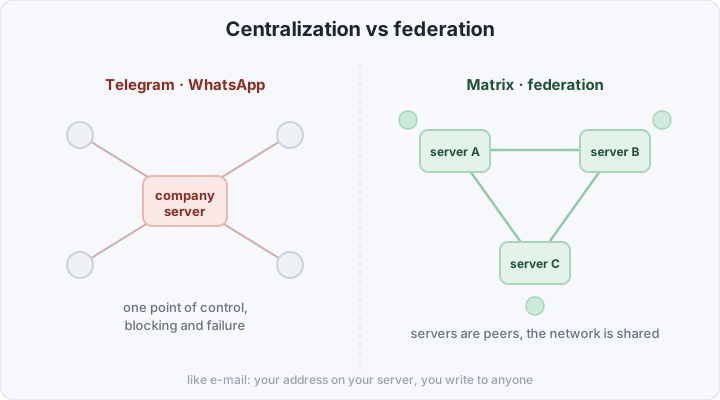
Matrix is not an app but an open protocol for messaging (the way HTTP is the protocol of the web). A server that implements it is called a homeserver; the most popular implementation is Synapse. matrix.org is just one server among thousands — not a “main” one.
The key word is federation. The best analogy is email: you have an address @your-domain, you run your own mail server, yet you exchange messages with anyone on gmail, on corporate domains and so on. Matrix works the same way: your ID looks like @you:your-domain.com, the server is yours, but you share rooms with people on matrix.org, mozilla.org and any other server.
The core problem with centralized messengers
When a service is centralized, you have neither ownership nor guarantees. It comes down to a few very practical things:
- A single point of control. An account can be banned without explanation, and a service can be blocked at the country level. Your chats become unreachable in an instant.
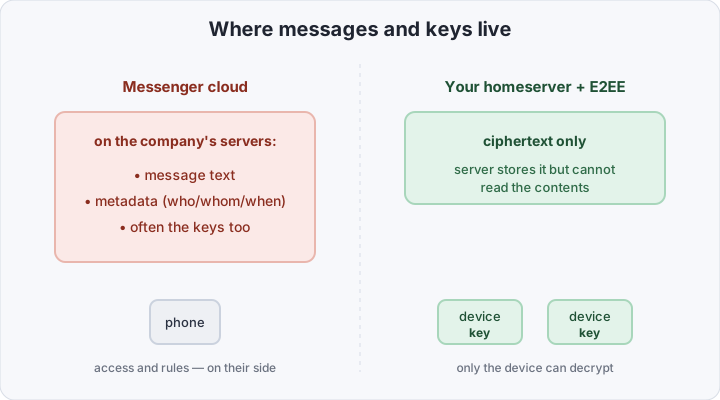
- Metadata. Even with end-to-end encrypted content, a centralized server sees the social graph: who talks to whom, when and how often. That’s frequently more valuable than the text itself.
- Phone-number binding. A phone number is the identifier, the deanonymization point, and the only “key” to the account, all at once.
- No portability. Taking your whole history and moving it to another service is usually impossible — you’re locked in.
Self-hosted Matrix removes each of these: control, data and identifier all stay on your side.
What Matrix changes
- Federation and ownership. The server is yours, the data sits on your disk. No one can “switch off” your account from the outside as long as your server runs.
- E2EE by default. Modern Element turns on end-to-end encryption (the Olm/Megolm algorithms) for direct and group chats automatically. The server stores only ciphertext — only participants’ devices can decrypt it.
- An identifier without a phone number. You create a login like
@you:your-domain.com. No mandatory SIM binding. - An open protocol and a choice of clients. Element is the best-known client, but not the only one: there’s FluffyChat, Cinny, SchildiChat and native apps for every platform. The protocol is open — no vendor lock-in.
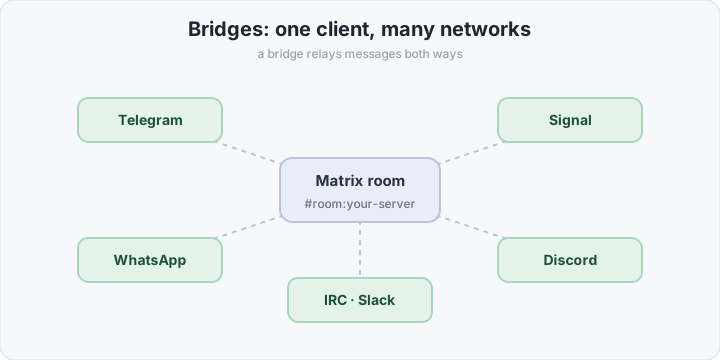
- Bridges. Matrix can reach into other networks: Telegram, WhatsApp, Signal, Discord, Slack, IRC. You type in one client and messages flow both ways.
Bridges deserve their own note — they’re what defuses the main objection, “but all my contacts are on Telegram.” Stand up a bridge (e.g. mautrix-telegram) and your Telegram chats show up in Element as ordinary rooms. One client, every network at once.
A one-table comparison
| Matrix (self-hosted) | Telegram | Signal | Slack / Discord | |
|---|---|---|---|---|
| Who controls the server | you | the company | the company | the company |
| Where data is stored | with you | with them | with them | with them |
| E2EE | yes, by default | “secret” chats only | yes | no |
| Phone number required | no | yes | yes | |
| Federation | yes | no | no | no |
| Bridges to other networks | yes | no | no | no |
| Open source | yes | partially | yes | no |
| Cost | your server | free | free | subscription |
The price of freedom here is exactly one thing: you have to stand the server up and maintain it yourself. Everything else is yours.
Clients and ecosystem maturity
It’s worth knowing that Matrix is not a niche experiment. The protocol is backed by the non-profit Matrix.org Foundation, the standard is open, and it’s implemented by dozens of independent projects. Matrix was adopted where the cost of failure is high: internal communications of the French government (the Tchap project), the German armed forces and healthcare, a number of universities. If state institutions trust the protocol, it’s more than mature enough for a personal server.
And because the client is decoupled from the server, you’re not locked into one app:
- Element — the flagship: web, desktop and mobile apps, full E2EE and Secure Backup. The one we’re deploying.
- SchildiChat — an Element fork with a more “Telegram-like” interface and a chat list.
- Cinny and FluffyChat — light, pleasant clients if Element feels heavy.
- nheko, Fractal — native desktop clients for people who dislike Electron.
They all talk to the same homeserver of yours — you can use different ones on different devices at once.
What you need to run your own server
A minimal production set: a domain, a small VPS (2 GB RAM is enough), a reverse proxy with TLS, and three containers — Synapse, PostgreSQL and Element. Step by step.
1. Generate the Synapse config. This one-off run creates homeserver.yaml and keys in ./synapse-data:
docker run -it --rm \
  -v $(pwd)/synapse-data:/data \
  -e SYNAPSE_SERVER_NAME=your-domain.com \
  -e SYNAPSE_REPORT_STATS=no \
  matrixdotorg/synapse:latest generate
Note: SYNAPSE_SERVER_NAME is the part after : in your ID (@you:your-domain.com), not the host the server physically runs on. The two can be split via .well-known (see below).
2. Switch Synapse to PostgreSQL. By default it generates SQLite, which is no good for production. Open synapse-data/homeserver.yaml and replace the database block:
database:
  name: psycopg2
  args:
    user: synapse
    password: change-me-please
    database: synapse
    host: postgres
    cp_min: 5
    cp_max: 10
3. Describe docker-compose.yml — three services on one network:
services:
  postgres:
    image: postgres:16-alpine
    restart: unless-stopped
    environment:
      POSTGRES_USER: synapse
      POSTGRES_PASSWORD: change-me-please
      POSTGRES_DB: synapse
      # Synapse needs exactly this locale:
      POSTGRES_INITDB_ARGS: "--encoding=UTF8 --locale=C"
    volumes:
      - ./postgres:/var/lib/postgresql/data

  synapse:
    image: matrixdotorg/synapse:latest
    restart: unless-stopped
    depends_on: [postgres]
    volumes:
      - ./synapse-data:/data
    ports:
      - "8008:8008" # client HTTP — hide it behind the reverse proxy

  element:
    image: vectorim/element-web:latest
    restart: unless-stopped
    volumes:
      - ./element-config.json:/app/config.json:ro
    ports:
      - "8080:80"
4. Configure the Element web client. A minimal element-config.json points the client at your homeserver:
{
  "default_server_config": {
    "m.homeserver": {
      "base_url": "https://matrix.your-domain.com",
      "server_name": "your-domain.com"
    }
  },
  "brand": "My Chat"
}
5. Provide TLS via a reverse proxy. Caddy fetches Let’s Encrypt certificates automatically — two blocks are enough (a subdomain for the API and one for the web client):
matrix.your-domain.com {
    reverse_proxy localhost:8008
}

chat.your-domain.com {
    reverse_proxy localhost:8080
}
6. Enable .well-known delegation. To keep IDs pretty (@you:your-domain.com) while the server lives on the matrix. subdomain, serve two files from the root domain. At https://your-domain.com/.well-known/matrix/server:
{ "m.server": "matrix.your-domain.com:443" }And at https://your-domain.com/.well-known/matrix/client (with an Access-Control-Allow-Origin: * header):
{ "m.homeserver": { "base_url": "https://matrix.your-domain.com" } }7. Start it and create an administrator:
docker compose up -d

# create the first user (the -a flag = admin)
docker compose exec synapse \
  register_new_matrix_user -u admin -a -c /data/homeserver.yaml http://localhost:8008
Done: open https://chat.your-domain.com, log in as admin, and you have your own messenger.
A mini example: a Telegram bridge
The main objection to switching is “but all my contacts are on Telegram.” A bridge solves it: Telegram chats arrive in Element as ordinary rooms, and you can reply right from there. Let’s take mautrix-telegram — add a fourth container to the same docker-compose.yml:
mautrix-telegram:
  image: dock.mau.dev/mautrix/telegram:latest
  restart: unless-stopped
  depends_on: [postgres, synapse]
  volumes:
    - ./mautrix-telegram:/data
The steps are short. The first run of the container creates config.yaml — fill in api_id and api_hash (from my.telegram.org) and the homeserver address. The second run generates registration.yaml, the file the bridge uses to introduce itself to Synapse. Wire it into homeserver.yaml:
app_service_config_files:
  - /data/telegram-registration.yaml
Restart Synapse, message the bot @telegrambot:your-domain.com with login, and your Telegram chats pull into Element. Bridges to WhatsApp, Signal and Discord install the same way — each is a separate appservice following the same scheme.
How to verify it works
First, confirm the client API answers from outside:
curl https://matrix.your-domain.com/_matrix/client/versions
# {"versions":["r0.6.1","v1.1", ... ]}
Then check that .well-known is served from the root domain:
curl https://your-domain.com/.well-known/matrix/server
# {"m.server":"matrix.your-domain.com:443"}
And the main test — federation. Open federationtester.matrix.org, enter your-domain.com and make sure every check is green. That means other Matrix servers can see yours and talk to it. After that, log in to Element, create a room and invite someone like @user:matrix.org — if messages flow, federation is up.
Pitfalls and maintenance
A server of your own isn’t “set it and forget it.” A few things to keep in mind:
- Registration is closed by default — leave it that way. Open registration without a captcha attracts spam bots instantly. Invite people manually with
register_new_matrix_user, or enable token-based registration. - Backups are the database and
synapse-data. Dump PostgreSQL and keep the wholesynapse-datadirectory: it holdssigning.keyand the.well-knownlogic. Losing the signing key means losing the server’s identity for the entire federation. - Turn on Secure Backup in Element. E2EE means keys live on devices. Without an enabled key backup (Secure Backup), losing your phone = losing access to the history of encrypted chats. It’s a one-minute setting in the client itself.
- Update deliberately.
docker compose pull && docker compose up -dupdates the images, but before major Synapse versions read the upgrade notes: schema migrations are sometimes required. - Watch the resources. Federating with large public rooms noticeably loads CPU and memory — the first join into a big room can take minutes and eat a gigabyte of RAM. For a personal server of a couple dozen people, 2–4 GB is plenty.
None of this is hard, but it’s the maintenance cost a cloud messenger doesn’t have. Then again, neither is the dependence on someone else’s cloud.
Bottom line
Matrix isn’t “yet another messenger” — it’s a change of model: instead of renting space in someone’s cloud, you get your own node in a shared federated network. The price is a server you must stand up and maintain. In return: ownership of your data, end-to-end encryption by default, an identifier with no phone-number binding, and bridges that keep you in touch even with the people who stayed on Telegram and WhatsApp. For a team — or a family that cares about privacy — that trade is almost always worth it.